
Attention! If you are interested in this software, you can download and install it for free. This program will work in full-featured mode for 15 days. After this period, a license is required for continued use.
OperatorPreviewHelper is a file preview utility (*.dxf, *.nc1, *.tap, etc.).
File types supported by OperatorPreviewHelper
| Extension | Description |
|---|---|
| *.dxf | AUTOCAD 2000 files |
| *.nc1 | Tekla part files |
| *.tap, *.cnc, *.nc | GCODE CNC program file |
| *.stc | Plasmicon trajectory file |
| *.cpg | Plasmicon CutPathGenerator file |
OperatorPreviewHelper utility video
The video demonstrates the operation of the OperatorPreviewHelper utility , previewing supported file formats in the Windows Explorer preview pane.
Installation
To install the utility, download the installation package and run the setup process. After the first launch, the program will work in full-featured mode for 15 days. Once the trial period ends, the program will require a license.
License installation
To obtain a license, you need a hardware key (HardwareID.txt) and a serial number, which you will receive after paying for the utility on the website. The hardware key can be obtained by running "c:\Program Files (x86)\Plasmicon\OperatorPreviewHelper\HardwareIdGenerator.exe". The program will generate a HardwareID.txt file in the program folder.
Follow the licensing instructions to use the existing Plasmicon licence service.
Upon completion, a license file named "OperatorPreviewHelper[XXXX-XXXX-XXXX-XXXX-XXXX-XXXX-XXXX-XXXX].license" tied to your computer hardware will be sent to your email. Place this file in the program folder "c:\Program Files (x86)\Plasmicon\OperatorPreviewHelper". Applying the license may require a computer restart.
Using the program
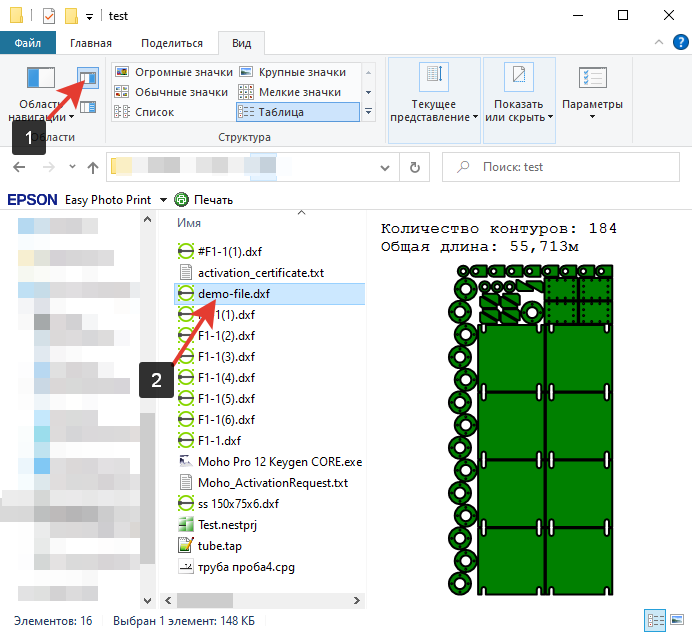
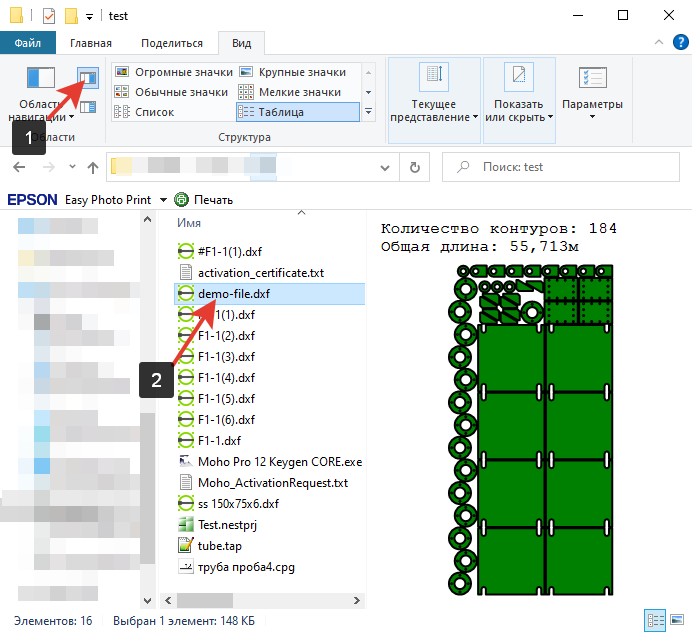
To see the program's output, expand the preview pane (1) in Windows Explorer and select a file (2) whose contents you want to view.
Software gallery
Select an image to inspect the original at full size. Screenshots show the software’s native interface.
Downloads and manuals
Use all features for 15 days after installation. A licence is required to continue afterwards.
Original supplier file services open in a new tab. Manuals, demonstrations and software screenshots may use a non-English interface.
Licensing and support
Email info@plasmicon.eu to confirm your quotation and purchase details. Read the licence guidance